



Your Numbers
You choose what to block. Nothing is forced on by default.
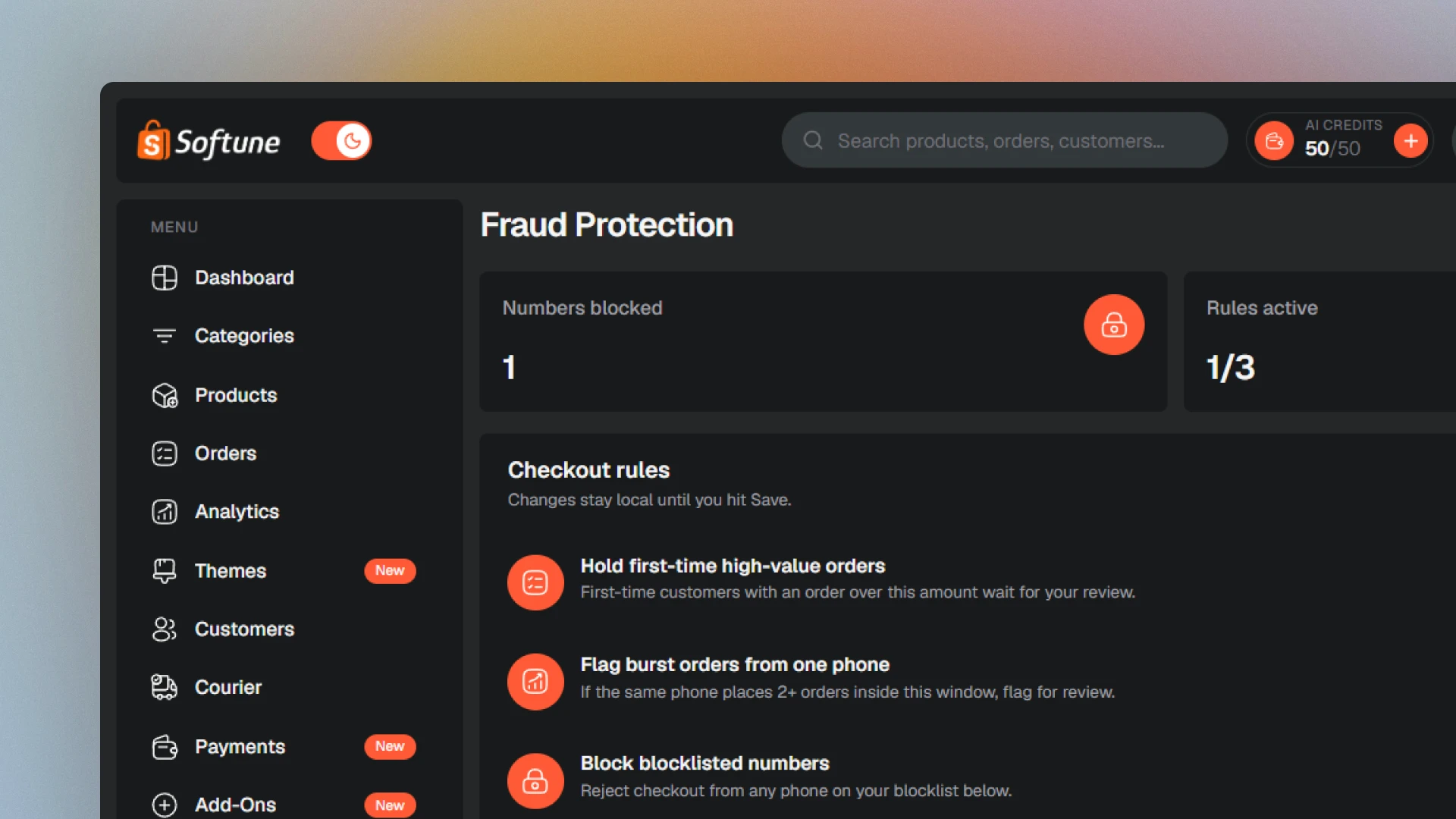
Protect Cash on Delivery sales with a phone blocklist, site-wide IP blocking, device checkout rules, and a Suspicious Orders review queue, all controlled from one SoftuneBD screen.

Block a visitor's IP address from your entire storefront, not only at checkout, and stop repeat checkout attempts from the same device automatically.
Add a phone to your store blocklist and SoftuneBD rejects it at checkout automatically, not just as a later warning.

Configure high-value first-order holds and burst-order flags, and toggle each rule independently from Fraud Protection.
You choose what to block. Nothing is forced on by default.

Blocklist entries can carry context for staff.

Configured beside Orders and Site Settings.





Everything you need to know about building with SoftuneBD.
SoftuneBD is an all-in-one ecommerce SaaS platform for small businesses and startups in Bangladesh. Create a professional online store, manage products and orders, accept COD, bKash, Nagad, and SSLCommerz, connect couriers, run Store Sale (POS), and grow from one dashboard.
Yes. SoftuneBD includes a 7-day free trial with full dashboard access. No credit card is required to start. After the trial you choose Starter, Growth, or Business on the pricing page.
No. Sign up with an email and password. SoftuneBD does not ask for a card to start the 7-day free trial.
No. SoftuneBD is built for non-technical users. Launch a store, add products, manage orders, and customize your storefront in the Theme Editor, no coding required.
Yes. SoftuneBD lets you switch between stores from one dashboard. The Business plan includes up to 3 storefronts on a single account. SoftuneBD does not offer unlimited stores on every plan.
SoftuneBD Payments covers Cash on Delivery, manual bKash and Nagad (shopper pays your wallet number and submits a transaction ID), plus official bKash, Nagad, and SSLCommerz merchant connects from the same screen. Stripe and PayPal are not available.
Minutes. Pick a pre-built theme, add products, enable a payment method, and publish, your store can be live and accepting orders the same day.
Yes. SoftuneBD isolates each merchant’s data by tenant, stores sensitive credentials encrypted, and includes Fraud Protection, phone blocklist, site-wide IP blocking, device checkout rules, and a Suspicious Orders review queue, to reduce COD abuse and fake orders.
Yes. SoftuneBD cares about your branding and identity, not a generic storefront that looks like everyone else's. Choose a professional theme and use SoftuneBD’s Theme Editor to change logo, colors, fonts, and sections with live desktop and mobile preview, no code. AI Suggest can propose changes you still review before publishing.
No. SoftuneBD cares about your branding and identity, not a generic storefront that looks like everyone else's. Logo, colors, fonts, and homepage sections stay yours, so the storefront reads as your brand instead of a default theme.
SoftuneBD Couriers lets you connect Steadfast, Pathao, RedX, and eCourier with your own merchant accounts today. The same screen also lists Paperfly, Sundarban, Carrybee, SA Paribahan, and PandaGo. SoftuneBD does not claim real-time public tracking or auto-booking for every partner.
Yes. You can move between Starter, Growth, and Business. See the live pricing page for current limits and what’s included on each plan.
SoftuneBD’s Gemini-powered AI chatbot answers questions about your products, orders, and sales from your own store data. AI Suggest helps with theme direction, and one-click AI writing drafts product descriptions. Merchants always confirm before AI changes go live, SoftuneBD does not auto-rewrite your store SEO without review.

Whether you need custom development, migration assistance, or just have a few questions, our team is ready to help you succeed on SoftuneBD.
Need bespoke features? We build custom themes and apps.
Let our experts set up and configure your store for you.
Having issues? Our support team is here to help 24/7.
Explore guides, API docs, and platform architecture.